
History of passwords
A long time ago, we were encouraged to make passwords something we could easily remember, like a pet’s name (let’s say “cosmo“), and to use the same password everywhere, for banking, email and computer access. Unfortunately, this made passwords easy for humans to guess – how many times have you filled in a Facebook quiz that asks about your pet name or your school?
We were then told we needed to add a number or special characters to make it more “complicated”. Often, we would add this to the end of the password. To make things easier, we’d often just add a 1 or our birth year on to the end. We now have “Cosmo1!“. Then we’d add more and more until the password became almost unrecognisable – “c0#mO2!“.
Graphic depiction of how passwords have developed
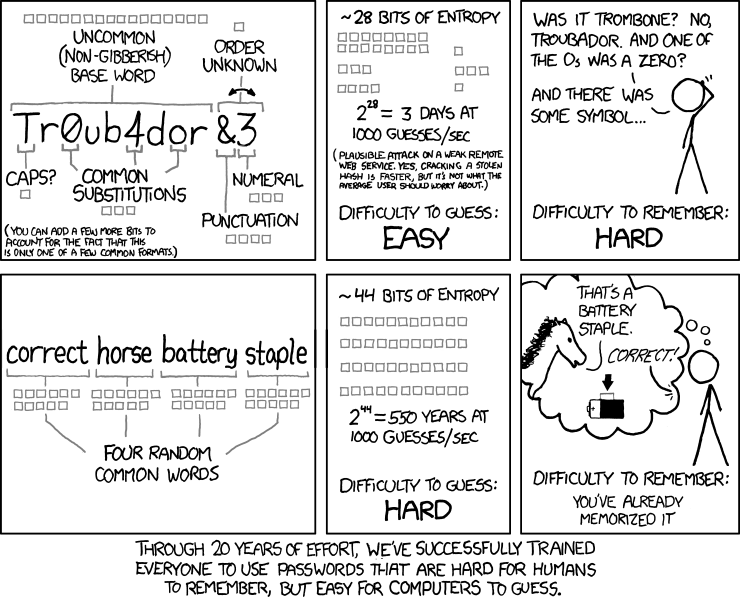
Over time, we perfected the art of creating passwords that were hard for humans to remember, and easy for computers to guess. To add to this, we forced people to change their passwords regularly, sometimes as often as monthly, further reducing any chance you’d remember it. Post-it notes were all too common – often found stuck to the computer that you needed the password for – almost as good as no password at all!
New guidance
Guidance has once again changed, and for the better. We now encourage people to create passwords that are easier for humans to remember, but difficult for computers to guess.
By having a long but less complicated password, we can increase the time taken to crack passwords by brute force (trying every password possible) exponentially.
Combining several random English words, separated by a dash, space or other punctuation, with capitalisation and a random special character.
E.g. public!PERHAPS!once!SCENE!743
You can generate passwords just like this by using our password generator above.
Summary
Passwords should be:
- Long, but easy to remember
- Not based on pet’s names, your names, or your birthdate – they’re just too easy to find on Facebook!
- Unique for every service – different passwords for the bank, your email and your loyalty card account
- Not written down anywhere
- We recommend you use a password manager so you don’t have to remember numerous different passwords, we believe your best choice is Bitwarden but you may prefer to allow your chosen browser, Edge, (our preference), or Google Chrome to save your password, however do ensure you are using a Microsoft or Google account within the browser. All these choices allow you to synch across your devices, Windows, Android etc so you always have your passwords to hand – you just need to remember the one (SECURE) password to the Bitwarden / Microsoft / Google account
Credits
Inspired by XKCD 936